What Is USB Power Delivery? A Complete Beginner's Guide (2026)
Article Navigation
- Introduction
- The Short Answer: What USB PD Actually Does
- How USB Power Delivery Works
- USB PD 2.0 vs PD 3.0 vs PD 3.1
- What Is PPS (Programmable Power Supply)?
- USB PD vs Other Fast Charging Standards
- What Can USB PD Charge?
- What to Check When Sourcing a USB PD Charger
- Why USB PD Matters for B2B Buyers and OEM Manufacturers
- Frequently Asked Questions
- Contact
What Is USB Power Delivery? Everything You Need to Know
If you've bought a phone, laptop, or tablet charger in the past few years, you've almost certainly encountered the term USB Power Delivery — usually shortened to USB PD. It appears on packaging, spec sheets, and supplier datasheets.
But what does it actually mean? How does it work? And why should it matter to anyone sourcing or specifying a charger?
This guide gives you a clear, jargon-free explanation — with the technical depth you need to make confident purchasing decisions.
The Short Answer: What USB PD Actually Does
USB Power Delivery is a charging protocol standard developed by the USB Implementers Forum (USB-IF). Its core function is simple: it allows a USB-C charger and a connected device to negotiate the optimal voltage and current for that specific charging session.
Before USB PD existed, USB ports delivered a fixed 5V at low current — enough to trickle-charge a phone slowly, but nothing more. USB PD changes that by enabling the charger and device to have a real-time conversation:
"How much power do you need?" "I can handle 45W at 15V. Can you supply that?" "Yes. Here it is."
This negotiation happens in milliseconds, automatically, every time you plug in a device. The result: faster, more intelligent, and safer charging.
How USB Power Delivery Works
USB PD operates through a dedicated CC (Configuration Channel) pin inside the USB-C connector. Here's what happens when you plug in a PD-compatible charger:
- Step 1 — Connection and Detection
The charger detects that a device has been connected. Both sides identify themselves as PD-capable and begin communication over the CC line. - Step 2 — Power Negotiation
The charger broadcasts a list of Power Data Objects (PDOs) — essentially a menu of power profiles it can offer (e.g., 5V/3A, 9V/3A, 15V/3A, 20V/5A). The device reviews the options and requests the profile that best matches its needs. - Step 3 — Power Delivery
The charger adjusts its output to match the agreed voltage and current, then begins delivering power at the negotiated level. - Step 4 — Dynamic Re-negotiation
If conditions change — for example, a second device is plugged into a multi-port charger — the parties can re-negotiate power levels in real time without interrupting charging.
This dynamic negotiation is what sets USB PD apart from fixed-voltage fast charging methods.
USB PD 2.0 vs PD 3.0 vs PD 3.1 — What Changed?
USB PD has gone through three major versions. Here's how they compare:
| Specification | Released | Max Power | Key Addition |
|---|---|---|---|
| USB PD 2.0 | 2012 | 100W (20V/5A) | First standard to push beyond 5V; fixed voltage profiles only |
| USB PD 3.0 | 2015 | 100W (20V/5A) | Added PPS (Programmable Power Supply) for adaptive voltage |
| USB PD 3.1 | 2021 | 240W (48V/5A) | Extended Power Range (EPR); enables laptop and workstation charging |
For most consumer and commercial applications, USB PD 3.0 is the current standard. PD 3.1 is increasingly relevant for high-performance laptops, gaming peripherals, and industrial devices that previously required proprietary power bricks.
Important note: To use USB PD 3.1 at its full 240W capacity, you need a PD 3.1-rated charger, a PD 3.1-rated cable (rated for 240W), and a device that supports EPR. All three components must be compatible.
What Is PPS (Programmable Power Supply)?
PPS is a sub-feature introduced in USB PD 3.0. Where standard PD uses fixed voltage steps (5V, 9V, 15V, 20V), PPS allows the charger to supply a continuously adjustable voltage and current within defined ranges.
Why does this matter?
- Standard PD can overshoot the ideal charging voltage slightly at each fixed step, which generates heat inside the battery
- PPS allows the voltage to track the battery's exact needs as it charges, reducing heat generation
The result is faster charging with lower thermal stress on the battery — extending battery lifespan over time
PPS is particularly valuable in smartphones with advanced thermal management (e.g., devices using Qualcomm's Quick Charge 4+ or Samsung's Adaptive Fast Charging, which are both PPS-compatible).
USB PD vs Other Fast Charging Standards
USB PD is not the only fast charging protocol in use. Here's how it compares to the major alternatives:
| Protocol | Developer | Max Power | Requires USB-C? | Open Standard? |
|---|---|---|---|---|
| USB PD 3.0 | USB-IF | 100W | Yes | ✅ Yes |
| USB PD 3.1 | USB-IF | 240W | Yes | ✅ Yes |
| Qualcomm Quick Charge 5 | Qualcomm | 100W | USB-A or USB-C | ❌ Licensed |
| Apple Fast Charge | Apple | 96W | USB-C | ❌ Proprietary |
| Samsung Super Fast Charge 2 | Samsung | 45W | USB-C (PPS-based) | Partially open |
| Huawei SuperCharge | Huawei | 66W | USB-C | ❌ Proprietary |
The key advantage of USB PD is universality. As an open, royalty-free standard, it is device-agnostic. A USB PD charger can fast-charge a Samsung Galaxy, a MacBook Pro, a Nintendo Switch, and a Lenovo ThinkPad — all without any proprietary adapter. This universal compatibility is a core reason why USB PD has been mandated by the EU as the common charger standard for consumer electronics sold in Europe from 2024 onwards.
What Can USB PD Charge?
USB PD is suitable for a broad range of device categories:
| Device Category | Recommended PD Wattage |
|---|---|
| Smartphones | 20–45W |
| Wireless earbuds / wearables | 5–18W |
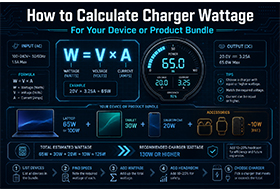
| Tablets | 30–65W |
| Thin-and-light laptops | 45–100W |
| High-performance laptops | 100–140W |
| Gaming laptops / workstations | 140–240W (PD 3.1 EPR) |
| Industrial / embedded devices | Varies by design; consult manufacturer |
One PD GaN charger can theoretically serve all of the above — as long as its maximum output meets the highest-demand device's requirements and it supports dynamic power distribution across multiple ports.
What to Check When Sourcing a USB PD Charger
For buyers and procurement teams, USB PD compliance is not binary — there are meaningful differences between a low-cost PD charger and a properly engineered one. Evaluate suppliers on:
- PD Version Compliance Confirm whether the charger supports PD 2.0, 3.0 (with PPS), or 3.1 (EPR). Ask for the actual protocol stack — not just the marketing label.
- Power Profiles (PDOs) Request the full list of supported voltage/current combinations. A charger advertising "100W PD" should offer multiple profiles, not just a single 20V/5A configuration.
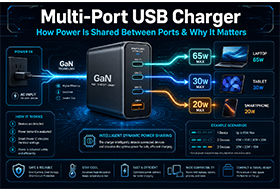
- Multi-Port Power Distribution Logic How does the charger allocate power when multiple devices are connected simultaneously? A 65W charger should not collapse to 5W per port — a well-designed unit will dynamically share power intelligently.
- Certifications USB PD chargers for consumer markets require regional certifications:
CE UKCA — European Union
UL ETL FCC — United States
PSE — Japan
KC — South Korea
BIS — India
RoHS REACH — Hazardous substances compliance (global)
Always request original certificates and verify them directly with the issuing body. - PPS Compatibility If your devices include smartphones with adaptive charging (Samsung, Xiaomi, OPPO, etc.), confirm the charger supports PPS — not just fixed-voltage PD.
- OEM Customization Can the manufacturer accommodate plug localization (US/EU/UK/AU), custom housing color, logo printing, or firmware customization? These details matter for brand-specific product bundles.
Why USB PD Matters for B2B Buyers and OEM Manufacturers
From a B2B sourcing perspective, USB PD adoption is no longer optional for most product categories:
- EU regulations (Common Charger Directive) require USB PD compliance for smartphones, tablets, cameras, and laptops sold in Europe since 2024–2026 rollout phases
- Device ecosystem pressure — Apple, Samsung, and Microsoft have all standardized on USB-C PD for their flagship devices
- Logistics and cost efficiency — a single PD charger can replace multiple proprietary adapters, reducing SKU complexity and packaging cost for bundled products
Partnering with a manufacturer who has deep USB PD engineering experience — not just assembly capability — means you get chargers that pass certification on the first submission and perform reliably in the field.
Shenzhen LvXiangYuan Technology Co., Ltd. has been designing power adapters with USB Power Delivery support since PD 2.0. Our current range covers:
- PD Wall Chargers — 20W to 100W, USB PD 3.0 with PPS, CE/UKCA/ETL/FCC/RoHS certified
- PD GaN Chargers — compact high-efficiency designs combining GaN hardware with USB PD 3.0 protocol
- Multi-Port PD Chargers — intelligent power distribution for simultaneous device charging
- Custom OEM Solutions — plug localization, branding, firmware, and packaging
👉 //www.hechobo.com/pd-usb-c-charger-usb-pd-3.0-pps.html 👉 //www.hechobo.com/blog/gan-charger-vs-pd-charger.html 👉 //www.hechobo.com/contact-us.html
Frequently Asked Questions
Q: Is USB Power Delivery the same as fast charging?
A: Not exactly. "Fast charging" is a general term describing any method of charging faster than the original USB standard (5W). USB PD is one specific fast charging protocol — the open, universal one standardized by the USB-IF. Other fast charging methods (Qualcomm QC, Huawei SuperCharge) use different protocols.
Q: Does my device need to support USB PD to use a PD charger?
A: Your device needs to support USB PD to take advantage of fast charging negotiation. If it doesn't, a PD charger will still charge it — but at the standard 5W rate. The device will not be damaged.
Q: Can USB PD charge laptops?
A: Yes — USB PD 3.0 supports up to 100W, sufficient for most ultrabooks. USB PD 3.1 supports up to 240W, which covers high-performance gaming laptops and workstations that previously required proprietary power bricks.
Q: What is the difference between USB PD and PPS?
A: USB PD is the overall protocol standard that governs power negotiation between devices. PPS (Programmable Power Supply) is a feature within USB PD 3.0 that enables continuously adjustable voltage output, rather than fixed voltage steps. A charger can support PD without supporting PPS, but the best current chargers support both.
Q: How do I verify that a supplier's charger genuinely supports USB PD?
A: Request the certification documentation from USB-IF and the protocol test report from the manufacturer. Legitimate USB PD chargers should have been tested against the USB-IF compliance test specification. Avoid suppliers who cannot produce these documents.
Q: Is USB PD safe for lithium batteries?
A: Yes, when the receiving device has a built-in Battery Management System (BMS) that regulates incoming power. The PD negotiation process itself includes safety checks — if the device stops responding correctly, the charger drops back to a safe 5V output.
GaN Charger vs Traditional Charger: Is the Upgrade Really Worth It?
GaN Charger vs PD Charger: Key Differences and Which One You Actually Need